




A competitor’s holiday offer lands while you’re still choosing a launch date. Then another arrives, followed by a reminder before your first promotion is ready. Tracking those sends gives your team time to spot patterns and decide whether to test an earlier launch or a different sending schedule.
The Holiday Inbox Is Already Crowded
The National Retail Federation’s 2026 survey found that 43% of holiday shoppers planned to start before November, making the weeks ahead of Black Friday worth watching. Begin monitoring early enough to see both the first offers and the follow-up emails. Those observations give you a basis for testing an earlier launch while your calendar still has room for changes.
Set Up Your Holiday Email Monitoring Before the Rush
Start with a manageable group of retailers and a repeatable collection process:
- Choose relevant competitors: Select a few brands that compete for similar shoppers, products and price points. A local gift shop might follow nearby retailers and online stores selling comparable gifts rather than every major department store.
- Create a dedicated inbox: Subscribe to those brands before holiday promotions accelerate. Keep the signup details consistent and note any preferences you select, since your inbox captures only the messages sent to that subscriber profile.
- Build a shared spreadsheet: Give each email its own row, with columns for brand, send date, subject line, offer and access requirements. Save a screenshot or email reference so teammates can check the original creative later.
If manual collection becomes time-consuming, consider a tracking tool and verify its current features before choosing one.
What to Track During the Holiday Email Window
Use the same categories for every brand so your records stay comparable:
- Timing and frequency: Record the first holiday promotion, weekly send counts and the first post-holiday clearance email. Count messages consistently so a reminder receives the same treatment across brands.
- Offers and access: Note the offer type, maximum discount and eligibility. Separate subscriber-only or password-protected promotions from sales available to everyone.
- Subject lines and urgency: Capture whether the subject emphasizes savings, exclusivity or a deadline. Log countdowns, offer expiration dates and shipping cutoffs separately rather than treating every urgent message as the same tactic.
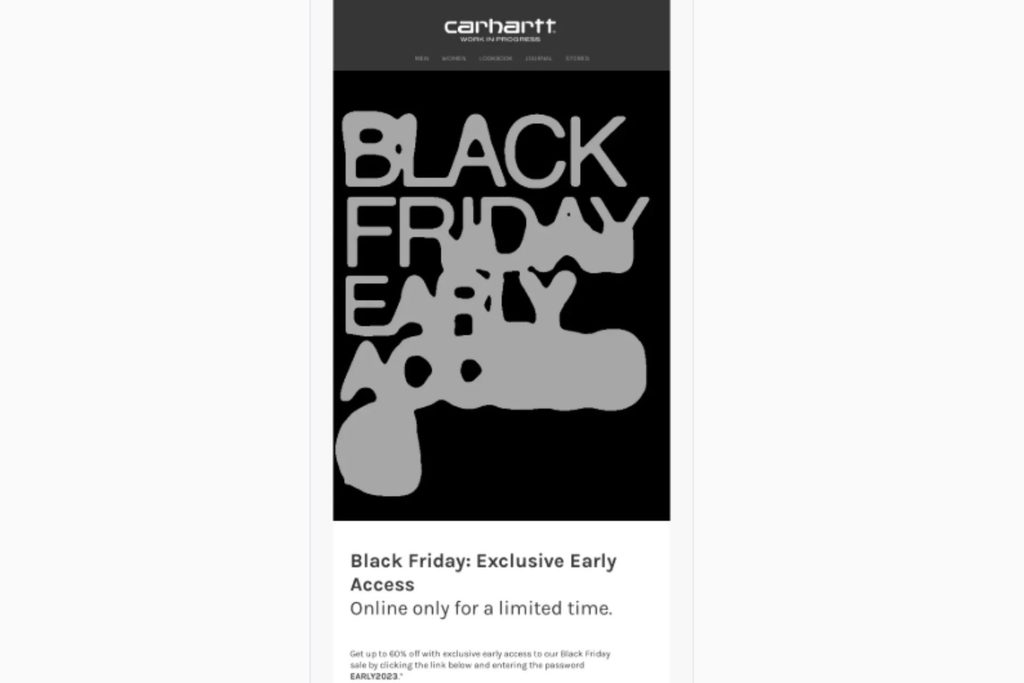
For example, Carhartt WIP offered early access to its Black Friday sale through a password-protected promotion advertising up to 60% off. Record the maximum discount, password requirement and November 22-23 redemption window. Keep the send date in a separate field and leave it unconfirmed.
Source: https://reallygoodemails.com/emails/black-friday-early-access
Build Your Competitor Holiday Email Timeline
Add competitor send dates to a calendar alongside your planned campaigns. Mark Thanksgiving, Black Friday and Cyber Monday separately, then add each retailer’s stated shipping deadlines. Look for overlapping promotions and gaps worth testing. Keep offer windows distinct from send dates so a two-day sale appears differently from two separate emails.
Adobe reported that 2025 Black Friday online spending in the United States rose 9.1% year over year, compared with 7.1% on Cyber Monday, although Cyber Monday generated more spending overall. Treat those as separate planning moments. For example, a competitor might launch early access before Friday while another waits until Monday. These differences reveal how brands spread their promotions across the holiday weekend.
Compare changes in email frequency with market signals to identify patterns worth investigating, while keeping traffic share separate from sales market share.
The Method for Connecting Cadence to Market Signals
Establish each brand’s baseline cadence, or usual sending frequency. Compare holiday weeks with equivalent weeks last year when records exist. Align weekly email counts with estimated traffic share, meaning each brand’s portion of visits across a fixed competitor group. Calculate that share by dividing its estimated visits by the group’s total. Use the report’s measurement dates, and allow for a possible delay between sends and visits.
Suppose a retailer usually sends twice weekly but sends five times during Black Friday week. Its estimated traffic share rises from 20% to 22%, a two-percentage-point gain. Record both changes and check the following week using a consistent comparison window. That gives you a defined relationship to investigate without establishing that extra emails produced extra sales.
Know the Limits Before You Draw Conclusions
A deeper discount, more advertising or better stock availability could also contribute to higher traffic. Estimated traffic share describes visits within your chosen group, while sales market share requires revenue or sales-volume data for the relevant market. In a 2022 study of 86 websites, Similarweb’s total-visit estimates averaged 19.4% lower than Google Analytics, although website rankings were significantly correlated.
Use that finding as a reason to treat estimates cautiously, rather than as a correction factor for individual retailers. Keep the provider, competitor group and reporting windows consistent, and treat relative comparisons as directional. Record competing explanations alongside each apparent relationship so your seasonal review preserves the context behind the numbers.
Email Tracking Tools Built for This Kind of Analysis
To investigate how competitor email frequency shifts correlate with market changes, consider tools that support send-pattern tracking or campaign research, then compare those observations with separate market data. Validity Engage, SendView and Milled support this research with competitor monitoring, sending-pattern reports and searchable campaign examples.
- Competitor tracking and inspiration: With Validity Engage, you can monitor brands and browse a library of over 1.2 million real campaigns. Its send-volume and timing insights can help you identify competitors’ busiest and quietest activity days when comparing holiday calendars.
- Sending-pattern reports: For schedule comparisons, SendView provides competitor email tracking and timing reports, including day-of-week and time-of-day views. These can help you compare sending schedules across the brands you follow.
- Campaign research: For creative research, Milled provides a searchable archive of e-commerce emails. Use it to research retailers’ holiday subject lines and offers, checking whether the campaigns and dates you need are available.
Turn Your Findings Into Action
Give each observation a practical next step in your own holiday calendar:
- Test a quieter window: Choose a gap between competitors’ promotions and compare it with your usual send time. Keep the offer and audience comparable so timing remains the main difference you’re evaluating.
- Try earlier access: If competitors launch sooner, test an early-access offer with a defined group of engaged subscribers. Change one element at a time rather than moving the launch, deepening the discount and increasing frequency together.
- Review audience response: Compare clicks, conversions and unsubscribes against your campaign goals. After the season, record what changed, what happened and which tests deserve another attempt before adopting a broader schedule change.
Your Notes Today Are Next Season’s Playbook
Save your timeline, email examples and test results as a reference for next year. The record will show when competitors launched offers and how their sending patterns changed around major holiday dates. Your campaign results add context for deciding which timing tests to repeat or adjust. Choose a few relevant competitors and start tracking now, with a regular update routine your team can maintain when the holiday workload grows.


Leave a Comment